Manage / Analytics & usage
Gain deep operational visibility into your AI assistant traffic. Track conversation volume, recurring visitor queries, token consumption costs, latency histograms, and monthly plan limits.
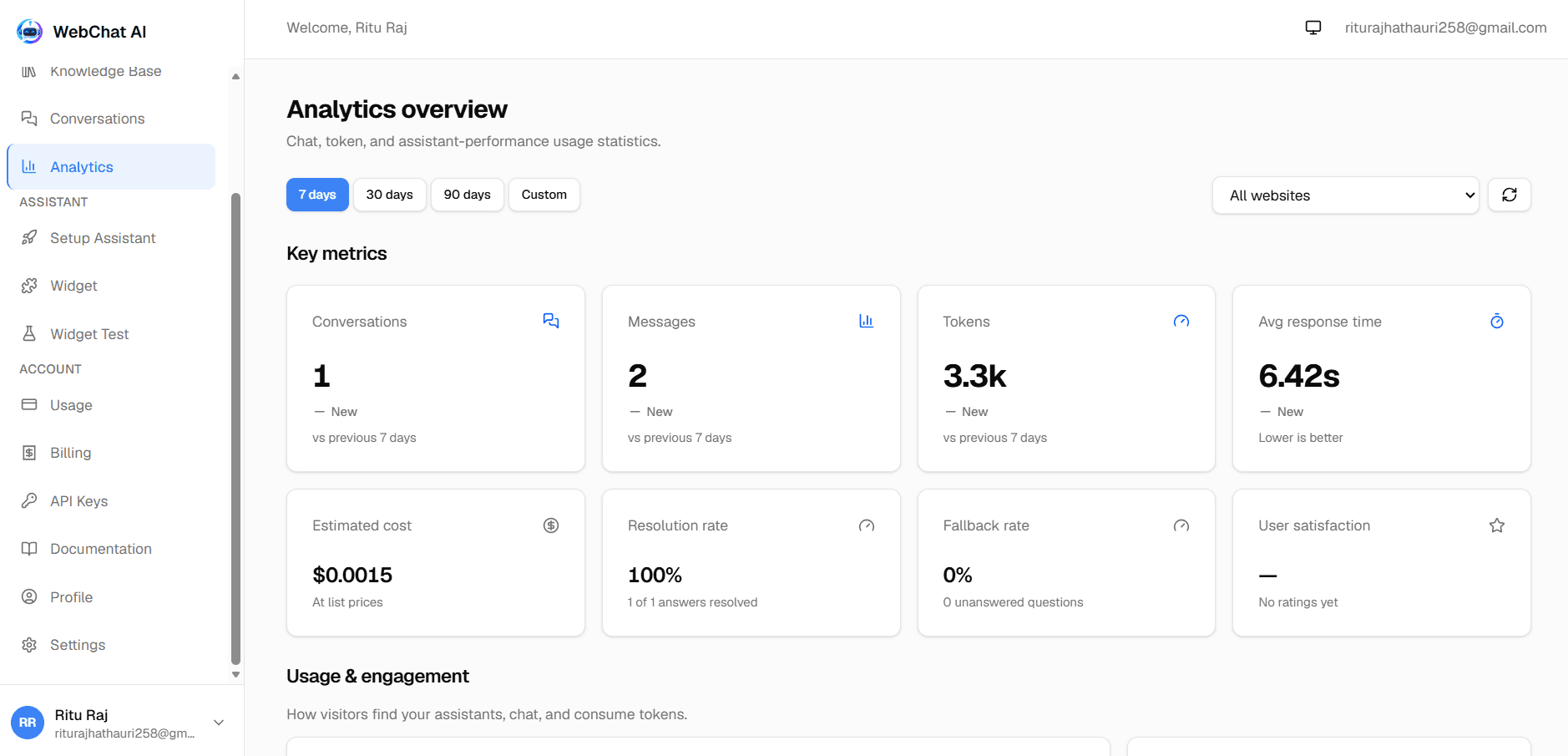
Headline metrics tracked across your entire assistant fleet or scoped per assistant.
The top of the Analytics view displays five critical operational health indicators, comparing the selected date range (7d, 30d, or 90d) against the preceding period:
Total Messages
Message Volume
Total inbound questions from visitors and outbound answers generated by your assistants.
Conversations
Unique Sessions
Distinct visitor conversation threads initiated through the embedded widget or test harness.
Response Time
Average Latency
Mean duration in seconds across retrieval, prompt assembly, and token streaming.
Token Cost
Estimated Usage
Calculated consumption of input (prompt) and output (completion) tokens across model providers.
Visitor Feedback
Satisfaction Rating
Percentage of positive ratings (thumbs up) and average 1-5 star user sentiment scores.
Identify what visitors ask most frequently and detect content gaps.
WebChat AI aggregates incoming visitor questions by normalized question text, ranking top inquiries by ask frequency and satisfaction rating. The Popular Questions table reveals:
Optimizing Documentation from Analytics
Understanding plan consumption, rate limits, and billing tiers.
Each subscription tier enforces predefined monthly quotas to protect system stability and predictable operating costs:
| Plan Tier | Chatbots | Crawled Pages | Monthly Messages | File Uploads |
|---|---|---|---|---|
| Free | 1 | 20 URLs | 50 / month | 10 MB / batch (max 5) |
| Starter | 3 | 200 URLs | 2,000 / month | 10 MB / batch (max 5) |
| Pro | 10 | 1,000 URLs | 10,000 / month | 10 MB / batch (max 5) |
| Enterprise | Custom | Custom | Custom | Custom limits |
When an assistant reaches its monthly query limit, the widget returns 429 MESSAGE_LIMIT_REACHED with a polite notice to the visitor. Account owners can upgrade anytime in the Billing panel to instantly restore query capacity.
Related documentation
Ready to build?
Register a website and get a live assistant in minutes.
 WebChat AI